Stickman Video Director: faceless stickman videos from a script
One skill that turns a topic, article or script into a stickman video in six cartoon styles. Director mode gives you a treatment, script and shot-by-shot prompts to make the clips yourself; Autopilot mode, in Claude Code or Codex, makes the pictures and voiceover, adds captions and sound effects, and renders a finished narrated video.
In short: One skill that turns a topic, article or script into a stickman video in six cartoon styles. Director mode gives you a treatment, script and shot-by-shot prompts to make the clips yourself; Autopilot mode, in Claude Code or Codex, makes the pictures and voiceover, adds captions and sound effects, and renders a finished narrated video. It is a free skill for people who use Claude Code or Codex and want help with ai video.
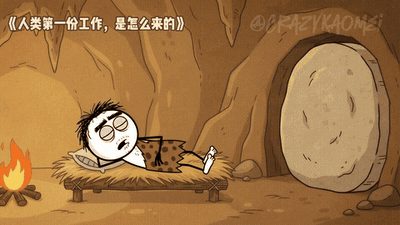
Real videos made with this skill, credited to their creators. Hover to preview.
EXPLAINER0:30
An Edo-period samurai story in the stickman history style
A 30-second sample of the Historical Cartoon style from Stickman Video Director: a round-headed samurai walks past a castle and down a lantern-lit street, then sits at a desk counting coins in a dead-pan office scene, the kind of history short the skill makes from a one-line brief.
Stickman Video Director@CrazyKaomei♥ 521
Try it in 60 seconds
git clone https://github.com/kaomei/stickman-video-director
cp -r stickman-video-director/skills/directing-stickman-videos ~/.claude/skills/
Autopilot: export GEMINI_API_KEY=... (your own key) and install ffmpeg
Install command copied from the project README. Check the README for the latest version.
What it does
One skill that turns a topic, article or script into a stickman video in six cartoon styles. Director mode gives you a treatment, script and shot-by-shot prompts to make the clips yourself; Autopilot mode, in Claude Code or Codex, makes the pictures and voiceover, adds captions and sound effects, and renders a finished narrated video.
A single skill (directing-stickman-videos) with two ways to work. Director mode writes a treatment, a script and scene-by-scene prompts plus sound notes in one of six stickman styles; you generate the clips in a video…
Two ways to make your videoGet startedA · Director Mode: scene-by-scene video promptsB · Autopilot Mode: from a brief to a long-form viA · Director Mode style galleryA1: Classic Black & WhiteA2: Modern PopA3: Prehistoric CaveA4: Cozy StorytellingA5: Historical CartoonB · Autopilot Mode style galleryB1: Minimal Hand-Drawn
A prompt to try
Use the stickman skill in Director mode: a 30-second Prehistoric Cave style short about why we procrastinate. Show me the treatment first.
Use the stickman skill in Director mode: a 30-second Prehistoric Cave style short about why we procrastinate. Show me the treatment first.
Written by us so you can reuse it. Replace each [bracket] with your details.
Step by step
Open the GitHub repo and watch the style previews.
Copy skills/directing-stickman-videos into ~/.claude/skills/ (or ask your agent to install it from the repo link).
Ask for Director mode first: a 30-second piece in one style, approve the treatment, then get the shot prompts.
For a finished video, set GEMINI_API_KEY, approve the script and the short preview, then let Autopilot render.
Watch out for
Autopilot spends credits on your own image and voice API key, so check the preview before the full render. A paid chat subscription does not include API credits. The repo is large (about 127 MB of preview GIFs), so copy only the skill folder if space matters. Music, voices and images from outside services keep their own licence terms.
One skill that turns a topic, article or script into a stickman video in six cartoon styles. Director mode gives you a treatment, script and shot-by-shot prompts to make the clips yourself; Autopilot mode, in Claude Code or Codex, makes the pictures and voiceover, adds captions and sound effects, and renders a finished narrated video.
Which AI agents can use Stickman Video Director?
It works with Claude Code and Codex. The code is on GitHub at kaomei/stickman-video-director.
Is Stickman Video Director free?
Free & open source (MIT). Director mode needs only the skill. Autopilot needs ffmpeg, Node and your own Gemini API key; image and voice generation is billed by Google to your key.
How do I install Stickman Video Director?
Run the install command from the README: “git clone https://github.com/kaomei/stickman-video-director”. Check the README on GitHub for the latest version, then follow the steps on this page.
Is Stickman Video Director safe to install?
We read 10 instruction and code files in the repo and found no red flags. That is not a guarantee, so review anything that runs commands on your machine.
Seven skills that take a novel through adaptation outline, character and scene bibles, screenplay and storyboard, ready for AI video generation.
Claude Code +1★ 4.7k
AGENT USE CASE
Produce a faceless YouTube video from a sheet row
n8n writes the script, adds voiceover and stock footage, assembles the video and logs it.
n8n +1
SKILL
director: take a video from idea to edit-ready footage
A directing skill that develops a topic or script into treatment, visual direction, characters and voice, shot plan and generated footage ready for editing.
Claude Code +1★ 809
AGENT USE CASE
A pipeline that turns news into finished YouTube Shorts
picks a news topic, writes a script, makes AI visuals and voiceover, adds captions and uploads to YouTube.
Codex +1★ 2.3k
SKILL
Higgsfield official skills
Official skills so coding agents can run Higgsfield image and video jobs.
Claude Code +1★ 1.3k
AGENT USE CASE
Prompt to vertical video for TikTok, Reels and Shorts
Open-source app that turns a text prompt into a ready-to-post vertical video with script, voice and captions.
Codex +1★ 892
Free newsletter
Friday Picks
New AI tools you can use right away, in plain words. Every Friday.



 EXPLAINER0:30